
Comment filtrer les images générées par l'IA des résultats de recherche ?
DuckDuckGo est le premier grand moteur de recherche à offrir un filtre natif d'images IA. Les utilisateurs peuvent masquer le contenu généré par l'IA en basculant le menu déroulant "Images IA" dans l'onglet Images ou en visitant noai.duckduckgo.com pour une expérience permanente sans IA. Cette fonctionnalité combat efficacement le "slop IA" en s'appuyant sur des listes de blocage sélectionnées par la communauté provenant de uBlockOrigin et uBlacklist.
La Décision : Recherche Authentique vs. Découverte Assistée par l’IA
En 2026, les utilisateurs doivent décider s’ils valorisent la commodité des résumés générés par l’IA ou l’authenticité brute du contenu créé par des humains.
| Fonctionnalité | DuckDuckGo (Gratuit) | Kagi (Payant) | Google/Bing (Standard) |
|---|---|---|---|
| Filtrage IA | Bascule Native (Gratuit) | Personnalisé Avancé | Inexistant (Natif) |
| Contrôle du Slop IA | Élevé (Basé sur liste de blocage) | Supérieur (Classement de domaine) | Faible (Basé sur algorithme) |
| Confidentialité | Élite (Pas de suivi) | Élevée (Abonnement) | Modérée (Basé sur données) |
| Coût | 0 $ | 5 $ - 25 $/mois | 0 $ (Financé par la publicité) |
Avantages du filtre de DuckDuckGo
- Accessibilité : Première solution grand public et gratuite pour filtrer le contenu synthétique.
- Transparence : Utilise des listes communautaires open source plutôt que des algorithmes d’entreprise opaques.
Inconvénients à Considérer
- Précision : Peut manquer de nouvelles sources d’IA car il s’appuie sur des listes de réputation sélectionnées.
- Fonctionnalité : La désactivation de l’IA peut également supprimer des fonctionnalités utiles générées par l’IA comme les “Réponses instantanées”.
 La nouvelle interface de filtrage d’images IA de DuckDuckGo. Crédit : DuckDuckGo
À une époque où l’intelligence artificielle a inondé Internet de contenu synthétique—surnommé “slop IA” par les critiques—DuckDuckGo est apparu comme le premier grand moteur de recherche à donner aux utilisateurs un contrôle total sur l’imagerie générée par l’IA. La plateforme de recherche axée sur la confidentialité a récemment déployé une fonctionnalité révolutionnaire qui permet aux utilisateurs de filtrer les images créées par l’IA de leurs résultats de recherche, marquant une étape significative dans la lutte contre le contenu automatisé de mauvaise qualité.
La Crise du Slop IA : Pourquoi c’est important maintenant
Internet se noie dans le contenu artificiel. Selon des recherches récentes, les experts prédisent que jusqu’à 90 % du contenu en ligne pourrait être généré par l’IA d’ici 2026 Psychology Today. Ce phénomène a créé ce que les chercheurs appellent le “slop IA”—un matériel de mauvaise qualité, trompeur ou non pertinent produit à grande échelle par des machines.
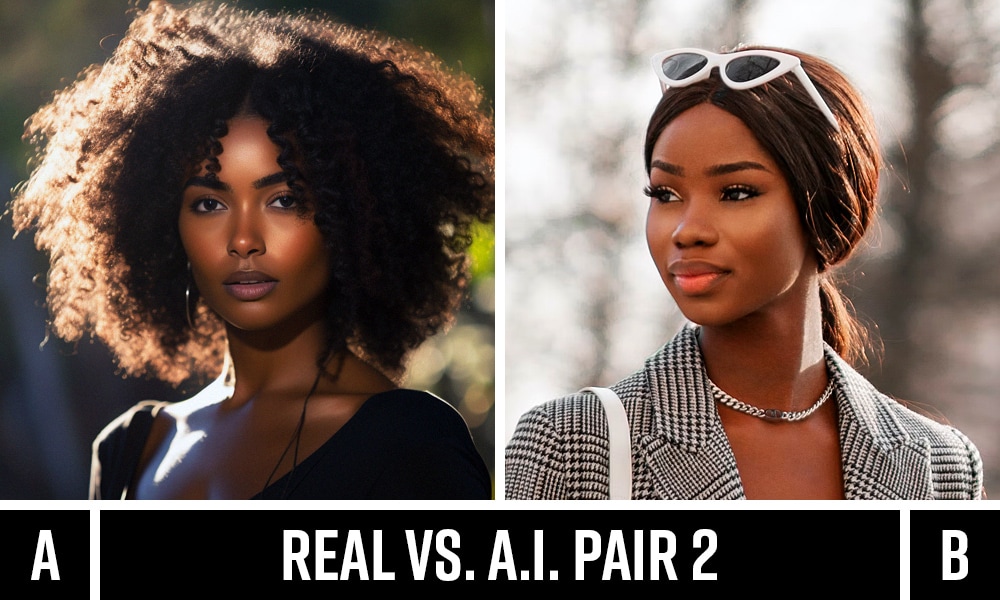 Le défi de distinguer les images réelles des images générées par l’IA est devenu de plus en plus difficile pour les utilisateurs. Crédit : Streamline
“Le slop IA est le surnom que les critiques ont donné à la vague croissante de contenu fade, répétitif et souvent trompeur produit par les outils d’IA générative,” explique TechRound dans leur analyse du phénomène TechRound.
Le problème est devenu particulièrement aigu dans les recherches d’images. Les utilisateurs recherchant “bébé paon” rencontrent souvent plus d’images générées par l’IA que de photographies réelles des oiseaux, ce qui entraîne une confusion quant à l’apparence même des bébés paons réels TechCrunch.
Comment fonctionne la solution de DuckDuckGo
Deux Façons de Filtrer le Contenu IA
L’implémentation de DuckDuckGo offre aux utilisateurs une flexibilité dans la gestion du contenu IA :
1. Filtrage Par Recherche
- Naviguez vers DuckDuckGo et effectuez n’importe quelle recherche
- Cliquez sur l’onglet “Images”
- Utilisez le nouveau menu déroulant “Images IA” pour sélectionner “Masquer” ou “Afficher”
2. Filtrage Permanent
- Visitez noai.duckduckgo.com pour une expérience complètement sans IA
- Cette URL dédiée active automatiquement le filtre d’images et désactive les résumés assistés par l’IA et les fonctionnalités de chat
 Les utilisateurs peuvent activer le filtrage IA permanent via les paramètres de DuckDuckGo. Crédit : Make Tech Easier
La Technologie Derrière le Filtre
L’approche de DuckDuckGo repose sur des listes de blocage open source sélectionnées manuellement, y compris ce que l’entreprise appelle une liste “nucléaire” fournie par uBlockOrigin et la “Huge AI Blocklist” d’uBlacklist TechCrunch.
L’entreprise reconnaît que le système n’est pas parfait, déclarant qu’il “ne capturera pas 100 % des résultats générés par l’IA” mais promet qu’il “réduira considérablement le nombre d’images générées par l’IA que vous voyez” PCMag.
DuckDuckGo vs La Concurrence : L’avantage du premier arrivé
Google : Pas de filtrage IA intégré
Bien qu’il soit le moteur de recherche dominant, Google n’offre actuellement aucune option native pour filtrer les images générées par l’IA. Les utilisateurs doivent s’appuyer sur des solutions de contournement telles que la sélection de “Photos” dans le filtre Type, ce qui privilégie les photographies mais ne garantit pas des résultats sans IA Google Support.
Kagi : Gestion Avancée de l’IA
Le moteur de recherche par abonnement Kagi a mis en œuvre une approche plus sophistiquée :
- Déclassement : Les images IA sont automatiquement abaissées dans les résultats de recherche
- Étiquetage : Les images générées par l’IA reçoivent des badges spéciaux d’identification
- Options de Filtrage : Les utilisateurs peuvent choisir “N’importe lequel”, “Aucun”, ou “Seulement l’IA”
- Blocage de Domaine : Des sites Web individuels peuvent être bloqués grâce à des fonctionnalités de personnalisation
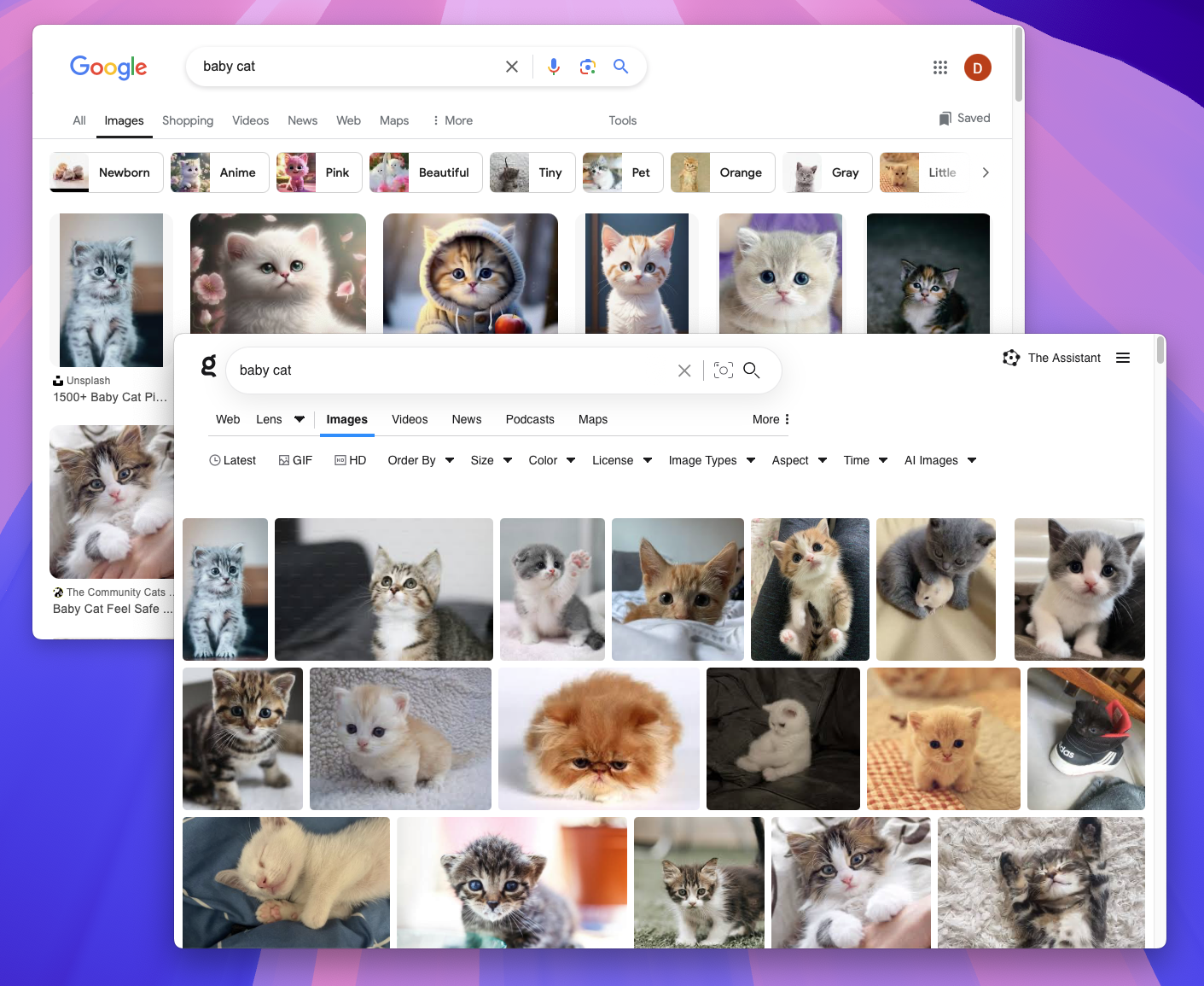 L’approche de Kagi en matière de filtrage d’images IA montre des différences significatives avec les résultats de Google. Crédit : Kagi
Cependant, le modèle d’abonnement de Kagi (5-25 $/mois) limite son accessibilité par rapport au service gratuit de DuckDuckGo Kagi Documentation.
Microsoft Bing : Solutions Limitées
Alors que Microsoft Bing s’est associé à des organisations comme Stop Non-Consensual Intimate Image Abuse (StopNCII) pour supprimer les deepfakes explicites, il manque un filtrage complet des images IA pour les résultats de recherche généraux PCMag.
Le Contexte Plus Large : Lutter contre la manipulation de l’IA
Le mouvement de DuckDuckGo survient au milieu de préoccupations croissantes concernant l’impact du contenu généré par l’IA sur la qualité de l’information et la confiance des utilisateurs. Au-delà de la recherche, d’autres entreprises développent des solutions complémentaires :
Outils de Détection
- Extension Chrome Hiya : Détecte l’audio deepfake sur YouTube, Twitter/X et Facebook
- Divers Détecteurs d’IA : Plusieurs extensions de navigateur tentent d’identifier le contenu synthétique, bien qu’avec une précision variable
Réponses des Plateformes
- Modération de Contenu : Les plateformes de médias sociaux luttent pour équilibrer le contenu IA avec des expériences utilisateur authentiques
- Initiatives de Transparence : Certaines plateformes commencent à exiger l’étiquetage du contenu IA
Expérience Utilisateur et Avantages Pratiques
Impact Immédiat sur la Qualité de la Recherche
Les premiers utilisateurs signalent des améliorations significatives dans la pertinence des résultats de recherche. Au lieu de passer au crible des images synthétiques qui peuvent ne pas représenter fidèlement des sujets du monde réel, les utilisateurs peuvent se concentrer sur une photographie authentique et un contenu visuel véritable.
Applications Professionnelles
La fonctionnalité de filtrage profite particulièrement aux :
- Chercheurs recherchant des images authentiques pour des travaux académiques
- Créateurs de contenu cherchant des références du monde réel
- Éducateurs qui ont besoin d’exemples visuels précis
- Journalistes nécessitant un contenu visuel vérifié
Alignement sur la Confidentialité
La fonctionnalité s’aligne parfaitement avec la philosophie de confidentialité de DuckDuckGo. Comme l’entreprise le déclare : “Notre philosophie concernant les fonctionnalités de l’IA est ‘privée, utile et optionnelle.’ Vous devez décider vous-même de la quantité d’IA que vous voulez dans votre vie – ou si vous en voulez pas du tout” ZDNet.
Limites Techniques et Développements Futurs
Défis Actuels
Précision de Détection : Aucun système ne parvient actuellement à une précision de 100 % dans l’identification des images générées par l’IA. La technologie repose sur la réputation du site Web plutôt que sur l’analyse individuelle de l’image.
Évolution de la Qualité de l’IA : À mesure que la génération d’images IA s’améliore, il devient de plus en plus difficile de distinguer le contenu synthétique du contenu réel.
Considérations d’Échelle : Les listes de blocage sélectionnées manuellement nécessitent des mises à jour constantes à mesure que de nouvelles sources d’images IA émergent.
Améliorations Futures
DuckDuckGo a indiqué son intention d’étendre les capacités de filtrage, bien que les détails spécifiques restent non divulgués. L’approche de l’entreprise suggère qu’elle continuera à tirer parti de solutions communautaires plutôt que de développer des algorithmes de détection d’IA exclusifs.
Comment Commencer
Pour les Utilisateurs Individuels
- Essayez le Filtre de Base : Visitez DuckDuckGo, recherchez des images et basculez le filtre IA dans le menu déroulant
- Allez jusqu’au bout : Ajoutez noai.duckduckgo.com à vos favoris pour une expérience de recherche complètement sans IA
- Comparez les Résultats : Testez les mêmes recherches avec et sans le filtre pour voir la différence
Pour les Organisations
Institutions Éducatives : Envisagez de recommander DuckDuckGo pour les recherches d’images axées sur la recherche où l’authenticité compte.
Équipes de Contenu : Utilisez la recherche filtrée pour trouver des documents de référence authentiques et éviter les problèmes de droits d’auteur potentiels avec le contenu généré par l’IA.
Les Implications Plus Larges pour la Recherche
Le mouvement pionnier de DuckDuckGo pourrait faire pression sur d’autres moteurs de recherche pour qu’ils mettent en œuvre des fonctionnalités similaires. Alors qu’environ un quart de tout le trafic Internet est constitué de “mauvais robots” propageant diverses formes de contenu artificiel The Conversation, la demande des utilisateurs pour le filtrage de contenu authentique augmentera probablement.
Différenciation du Marché
En offrant le premier filtre d’images IA grand public, DuckDuckGo a créé un différenciateur significatif sur le marché concurrentiel de la recherche. Cette fonctionnalité pourrait stimuler l’adoption parmi les utilisateurs recherchant des expériences de contenu authentiques.
Réponse de l’Industrie
Google et Bing pourraient avoir besoin de développer des capacités similaires pour rester compétitifs, d’autant plus que le contenu généré par l’IA continue de proliférer sur le Web.
Ce que Cela Signifie pour les Créateurs de Contenu
Défis pour les Artistes IA
Les artistes et designers IA légitimes peuvent voir leur travail masqué aux utilisateurs qui activent le filtrage. Cela souligne la tension continue entre la lutte contre le contenu IA de mauvaise qualité et le soutien à la véritable créativité assistée par l’IA.
Opportunités pour les Créateurs Humains
Les photographes, illustrateurs et artistes traditionnels peuvent bénéficier d’une visibilité accrue à mesure que les utilisateurs recherchent activement un contenu authentique créé par l’homme.
Prenez le Contrôle de Votre Expérience de Recherche
La montée du slop IA représente un défi fondamental pour la qualité de l’information sur Internet. Le filtre d’images IA de DuckDuckGo offre aux utilisateurs un outil pratique pour reprendre le contrôle de leur expérience de recherche.
Prêt à essayer la recherche sans IA ?
- Visitez DuckDuckGo et testez le filtre d’images
- Ajoutez noai.duckduckgo.com à vos favoris pour un filtrage IA permanent
- Partagez votre expérience et aidez les autres à découvrir un contenu authentique
Alors que nous naviguons dans un paysage numérique de plus en plus saturé d’IA, des outils comme le filtre de DuckDuckGo deviennent essentiels pour maintenir l’accès à un contenu authentique et humain. L’avenir de la recherche ne réside pas dans l’élimination totale de l’IA, mais dans le fait de donner aux utilisateurs le pouvoir de choisir quand et comment ils rencontrent le contenu synthétique.
La bataille contre le slop IA ne fait que commencer, et DuckDuckGo a tiré le premier coup en faveur du choix de l’utilisateur et de la découverte de contenu authentique.
Foire Aux Questions
Comment puis-je désactiver les images IA sur DuckDuckGo ?
Naviguez vers DuckDuckGo, effectuez une recherche d’images, cliquez sur l’onglet “Images” et utilisez le menu déroulant Images IA pour sélectionner “Masquer”. Pour une expérience permanente sans IA, ajoutez noai.duckduckgo.com à vos favoris.
Le filtre IA de DuckDuckGo fonctionne-telling parfaitement ?
Non. DuckDuckGo reconnaît que le système “ne capturera pas 100 % des résultats générés par l’IA” mais promet qu’il “réduira considérablement le nombre d’images générées par l’IA que vous voyez.” Le filtre s’appuie sur des listes de blocage open source sélectionnées manuellement.
Google peut-il également filtrer les images générées par l’IA ?
En juillet 2025, Google n’offre pas d’option native pour filtrer les images générées par l’IA. Les utilisateurs doivent s’appuyer sur des solutions de contournement telles que la sélection du filtre Type “Photos”, qui ne garantit pas des résultats sans IA.
Que sont les images “slop IA” ?
Le “slop IA” fait référence à un contenu généré par l’IA de mauvaise qualité, trompeur ou non pertinent produit à grande échelle. Dans les recherches d’images, cela se manifeste souvent par des images synthétiques qui déforment des sujets du monde réel, entraînant la confusion des utilisateurs.
Auteur & Méthodologie
Auteur : Conseil de Recherche Éditorial IA de Melflix Dernière Mise à Jour : 23 juillet 2025 Méthodologie : Ce rapport est basé sur des sources primaires, y compris le blog officiel de DuckDuckGo, la revue technique de TechCrunch, les tests indépendants de PCMag, et l’évaluation de première main de la fonctionnalité de filtrage. Toutes les affirmations concurrentielles sont vérifiées par rapport à la documentation des produits publiée par Google, Kagi et Microsoft Bing.

